Typing Games Z Type for Complete Beginners
9 more typing games: (1) Nitro Type (2) Ninja Cat (3) TypeRacer / Type Racer (4) Zombie Typing Game Typocalypse (5) Dance Mat Typing (6) Keyboard Climber 2 (7) Just Type This (8) Flying Race (9) Save The Child
★★★ 168 Typing Lessons ★★★ $375 Course FREE (Limited Time Offer)
To start the game, just click on the game canvas or type 1, 2, or 3 on your keyboard.
Complete a Typing Test in 60 Seconds!
144 Free Typing Practice Lessons. Try Now.
Video Tutorial: How to play this game
How to play:
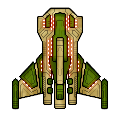
The beautiful spaceship above is your spaceship. In this ZType / Z Type game, you should shoot the approaching enemy spaceships up. The enemy spaceships will approach from the opposite side. But they will not be able to shoot you until they are very close to you. Type the word you see behind your target enemy spaceship before they shoot you.
Very important: Always try to shoot the nearest spaceship first so that no enemy can approach very close to shoot you.
Every time you select a word / enemy, the color of target word will change. Once you successfully finish typing your target word, an explosion will occur and your target enemy will go away.
To select / change difficulty level, please type / press 1, 2, or 3 on your keyboard when you see the game start or game over screen.
You must type fast to win every time in this ZType / Z Type game.
In the easy level, you must score minimum 26 words per minute to win. In the medium level, minimum 46 words per minute is required. But in the hard level, you need minimum 81 words per minute to win.
Virtual Gold Medals: If you score more than 80 words per minute, you will get three virtual gold medals which is the highest rank in this game. If you are winning three virtual gold medals every time, you surely have professional typing skill which is a desired skill for many people. But you get two virtual gold medals if score between 61 and 80. Finally, you get only one gold medal for scoring between 46 and 60.
The spaceships in this ZType / Z Type game are designed by MillionthVector. Thanks to them.
1. Typing Practice » Beginner Level » Home Row (1 - 17)
Practice Lesson 1: Index fingers: J and F
Practice Lesson 2: Middle fingers: K and D
Practice Lesson 3: Review: JFKD
Practice Lesson 4: Ring fingers: S and L
Practice Lesson 5: Pinkie fingers: A and ;
Practice Lesson 6: Index fingers: G and H
Practice Lesson 7: Back and forth
Practice Lesson 8: Left hand keys 1
Practice Lesson 9: Left hand keys 2
Practice Lesson 10: Right hand keys 1
Practice Lesson 11: Right hand keys 2
2. Typing Practice » Beginner Level » Top Row (18 - 32)
Practice Lesson 18: Index fingers: R and U
Practice Lesson 19: Middle fingers: E and I
Practice Lesson 20: Ring fingers: W and O
Practice Lesson 21: Pinkie fingers: Q and P
Practice Lesson 22: Index fingers: T and Y
Practice Lesson 23: Back and forth
Practice Lesson 24: All left hand 1
Practice Lesson 25: All left hand 2
Practice Lesson 26: All right hand 1
Practice Lesson 27: All right hand 2
3. Typing Practice » Beginner Level » Bottom Row (33 - 46)
Practice Lesson 33: Index fingers: V and M
Practice Lesson 34: Middle fingers: C and ,
Practice Lesson 35: Ring fingers: X and .
Practice Lesson 36: Pinkie fingers: Z and /
Practice Lesson 37: Index fingers: B and N
Practice Lesson 38: Back and forth
Practice Lesson 39: All left hand 1
Practice Lesson 40: All left hand 2
Practice Lesson 41: All right hand 1
Practice Lesson 42: All right hand 2
4. Typing Practice » Beginner Level » Miscellaneous (47 - 68)
Practice Lesson 47: Review 1: Left hand words
Practice Lesson 48: Review 2: Right hand words
Practice Lesson 49: Review 3: Alternating hand words
Practice Lesson 50: Capitals 1
Practice Lesson 51: Capitals 2
Practice Lesson 52: Capitals 3
Practice Lesson 53: Capitals 4
Practice Lesson 62: Numeric Keypad 1
Practice Lesson 63: Numeric Keypad 2
Practice Lesson 64: Numeric Keypad 3
Practice Lesson 65: Numeric Keypad 4
Practice Lesson 66: Easy Words
Practice Lesson 67: Easy Words
Practice Lesson 68: Easy Words
5. Typing Practice » Intermediate Level (69 - 110)
Practice Lesson 69: Common Letter Combinations - CK
Practice Lesson 70: Common Letter Combinations - CH
Practice Lesson 71: Common Letter Combinations - PH
Practice Lesson 72: Common Letter Combinations - GH
Practice Lesson 73: Common Letter Combinations - TH
Practice Lesson 74: Common Letter Combinations - DG
Practice Lesson 75: Common Letter Combinations - ION
Practice Lesson 76: Common Letter Combinations - OUS
Practice Lesson 77: Common Letter Combinations - ATE
Practice Lesson 78: Common Letter Combinations - QU
Practice Lesson 79: Common Letter Combinations - IAL
Practice Lesson 80: Common Letter Combinations - ENT
Practice Lesson 81: Common Letter Combinations - ER
Practice Lesson 82: Common Letter Combinations - GRA
Practice Lesson 83: Common Letter Combinations - OR
Practice Lesson 84: Common Letter Combinations - ABLE
Practice Lesson 85: Common Letter Combinations - IC
Practice Lesson 86: Common Letter Combinations - EI
Practice Lesson 87: Common Letter Combinations - ACY
Practice Lesson 88: Common Letter Combinations - EX
Practice Lesson 89: Common Letter Combinations - ON
Practice Lesson 90: Common Letter Combinations - IN
Practice Lesson 91: Common Letter Combinations - ING
Practice Lesson 92: Common Letter Combinations - ARY
Practice Lesson 93: Common Letter Combinations - LY
Practice Lesson 94: Common Letter Combinations - GY
Practice Lesson 95: Common Letter Combinations - ED
Practice Lesson 96: Common Letter Combinations - AL
Practice Lesson 97: Common Letter Combinations - TRAN
Practice Lesson 98: Common phrase practice 1
Practice Lesson 99: Common phrase practice 2
Practice Lesson 100: Common phrase practice 3
Practice Lesson 101: Common phrase practice 4
Practice Lesson 102: Common phrase practice 5
Practice Lesson 103: Common phrase practice 6
Practice Lesson 104: Common phrase practice 7
Practice Lesson 105: Common phrase practice 8
Practice Lesson 106: Common phrase practice 9
Practice Lesson 107: Common phrase practice 10
Practice Lesson 108: Common phrase practice 11
Practice Lesson 109: Common phrase practice 12
Practice Lesson 110: Common phrase practice 13
6. Typing Practice » Advanced Level (111 - 144)
Practice Lesson 111: Using Right Hand SHIFT Key
Practice Lesson 112: Using Left Hand SHIFT key
Practice Lesson 113: Using Each SHIFT Key
Practice Lesson 114: Left hand only - short words
Practice Lesson 115: Left hand only - longer words
Practice Lesson 116: Right hand only - easy words
Practice Lesson 117: Right hand only - harder words
Practice Lesson 118: Words with alternate hands letters
Practice Lesson 119: Numbers and Special Characters - Left hand
Practice Lesson 120: Numbers and Special Characters - Right hand
Practice Lesson 121: Numbers and Special Characters - Left hand - More difficult
Practice Lesson 122: Numbers and Special Characters - Right hand - More difficult
Practice Lesson 123: Tongue twisters 1
Practice Lesson 124: Tongue twisters 2
Practice Lesson 125: Tongue twisters 3
Practice Lesson 126: Tongue twisters 4
Practice Lesson 127: Tongue twisters 5
Practice Lesson 128: Tongue twisters 6
Practice Lesson 129: Tongue twisters 7
Practice Lesson 130: Tongue twisters 8
Practice Lesson 131: Tongue twisters 9
Practice Lesson 132: Tongue twisters 10
Practice Lesson 133: Tongue twisters 11
Practice Lesson 134: Tongue twisters 12
Practice Lesson 135: Tongue twisters 13
Practice Lesson 136: Tongue twisters 14
Practice Lesson 137: Tongue twisters 15
Practice Lesson 138: Tongue twisters 16
Practice Lesson 139: Tongue twisters 17
Practice Lesson 140: Tongue twisters 18
Practice Lesson 141: Tongue twisters 19
Practice Lesson 142: Tongue twisters 20
Practice Lesson 143: The hardest words to type 1
Practice Lesson 144: The hardest words to type 2
7. Typing Practice » Miscellaneous (145 - 166)
Practice Lesson 145: Alphanumeric Typing Test: 1
Practice Lesson 146: Alphanumeric Typing Test: 2
Practice Lesson 147: Alphanumeric Typing Test: 3
Practice Lesson 148: Alphanumeric Typing Test: 4
Practice Lesson 149: Alphanumeric Typing Test: 5
Practice Lesson 150: Alphanumeric Typing Test: 6
Practice Lesson 151: Alphanumeric Typing Test: 7
Practice Lesson 152: Alphanumeric Typing Test: 8
Practice Lesson 153: Alphanumeric Typing Test: 9
Practice Lesson 154: Alphanumeric Typing Test: 10
Practice Lesson 155: English Alphabet Typing Test
Practice Lesson 156: ASDF JKL; - Home-Row Practice
Practice Lesson 157: QWERT YUIOP - Top-Row Practice
Practice Lesson 158: ZXCVB NM,./ - Bottom-Row Practice
Practice Lesson 159: Left Hand Typing Practice
Practice Lesson 160: Right Hand Typing Practice
Practice Lesson 161: Symbols & Special Character
Practice Lesson 162: Numbers & symbols
Practice Lesson 163: Random Word Typing
Practice Lesson 164: Common Word Typing
Practice Lesson 165: Legal Typing Test
Practice Lesson 166: Medical Typing Practice
Practice Lesson 167: Home-Row Typing Practice Words
Practice Lesson 168: Home-Row and Upper Row Typing Practice Words
Online Typing Test in English
1 Minute Typing Test
2 Minute Typing Test
3 Minute Typing Test
5 Minute Typing Test
10 Minute Typing Test
10 Typing Games / Typewriting Games










Bookmark This Page (Ctrl + D)


Typing Test — Top 10 (ten) World Ranking
Get an online typing test certificate now
Please note: We may delete certificates older than 6 (six) months.
Best Score | World Ranking | Countrywise Ranking
Get a Certificate | Register | Log In
WPM = Words per minute
| Sl. | Name | Level | Net WPM | Accuracy | Country |
|---|---|---|---|---|---|
| 1. | Broderick Bagert | Professional | 111 | 99.10% | United States |
| 2. | Farhan | Professional | 93 | 93.96% | Indonesia |
| 3. | Teoh You Le | Professional | 83 | 95.41% | Malaysia |
| 4. | Braeden Edward O'Daniel | Fast | 68 | 97.13% | United States |
| 5. | Laura Elizabeth Ewing | Fast | 67 | 94.38% | United States |
| 6. | Laura Elizabeth Ewing | Fluent | 60 | 93.79% | United States |
| 7. | Laura Elizabeth Ewing | Fluent | 59 | 90.77% | United States |
| 8. | Laura Elizabeth Ewing | Fluent | 56 | 93.29% | United States |
| 9. | Laura Elizabeth Ewing | Fluent | 53 | 82.87% | United States |
| 10. | Osama Abbas hussain | Fluent | 47 | 100.00% | Pakistan |
How we grade your typing speed:
| Level | Net WPM |
|---|---|
| Slow | 0 - 25 |
| Average | 26 - 45 |
| Fluent | 46 - 60 |
| Fast | 61 - 80 |
| Professional | 80+ |
Performance Graph — Based on top 10 (ten) world ranking
Typing Test — Last 25 Practice Results
Get an online typing test certificate now
Please note: We may delete certificates older than 6 (six) months.
Best Score | World Ranking | Countrywise Ranking
Get a Certificate | Register | Log In
The following list shows how some users of this website have performed within last 24 hours.
WPM = Words per minute
How we grade your typing speed:
| Level | Net WPM |
|---|---|
| Slow | 0 - 25 |
| Average | 26 - 45 |
| Fluent | 46 - 60 |
| Fast | 61 - 80 |
| Professional | 80+ |
Performance Graph — Based on last 25 results
Typing Games Z Type for Complete Beginners
Have you ever wished typing could feel less like boring homework and more like a fast little adventure your fingers actually enjoy? Imagine a game where letters fly toward you, danger gets closer, and your only “superpower” is the keyboard sitting right under your hands. Every correct letter you type feels like a tiny win. Every word you finish feels like you just saved the day.
That is the feeling many beginners get when they first try typing games z type. It turns regular typing practice into a fun challenge. But here is the question that makes this topic so interesting: why do some beginners improve quickly with typing games z type while others play for weeks and still feel slow?
Do not rush past that question.
The answer can change the way you practice. It can help you stop guessing. It can help you type faster, make fewer mistakes, and feel more confident at the keyboard. By the end of this guide, you will understand how typing games z type works, why it helps complete beginners, and how to use it step by step without feeling lost, bored, or frustrated.
This is not only about playing a game. It is about building a real skill while your brain thinks, “Hey, this is kind of fun.”
Understanding Typing Games Z Type
Typing games z type is a typing practice game that makes learning feel like action. Instead of staring at a blank typing box and forcing yourself to repeat random words, you type letters and words to stop objects, enemies, or challenges coming toward you on the screen.
Your keyboard becomes the controller. Your fingers become the action heroes. Your eyes follow the words. Your brain starts making fast connections between letters and finger movement.
That is why typing games z type is useful for beginners. It gives you a reason to pay attention. It gives you instant feedback. It makes each correct letter matter.
For a complete beginner, this is powerful. Many people quit typing practice because it feels dull. They start with good energy, practice for a day or two, and then forget about it. But when practice feels like a game, it becomes easier to come back again.
Typing games z type helps you practice speed, accuracy, focus, and keyboard memory at the same time. You are not only learning where the keys are. You are learning how to react, stay calm, and keep your fingers moving.
Why Typing Matters More Than Ever
Typing is not a small computer skill anymore. It is part of everyday life.
You type when you search online. You type when you message a friend. You type when you write an email. You type when you apply for a job, fill out a form, write a school assignment, post on social media, or work from home.
Even simple tasks feel harder when typing is slow.
Imagine trying to write a short email, but every sentence takes forever. You look down at the keyboard. You press the wrong key. You delete. You start again. It feels annoying. It breaks your focus. It can even make you avoid writing.
Now imagine typing smoothly. Your ideas move from your mind to the screen without a fight. You answer faster. You finish homework faster. You complete work faster. You feel more comfortable using a computer.
That is why typing games z type is more than entertainment. It can help beginners build a skill that saves time for years.
Many beginners start around 10 to 20 words per minute. That is normal. Many office and school tasks feel more comfortable around 40 words per minute or higher. Some people type much faster than that, but you do not need to compare yourself to experts. Your goal is simple: become better than you were yesterday.
Typing games z type gives you a fun path to reach that goal.
Why Typing Games Z Type Helps Beginners Learn Faster
Let’s return to the question from the beginning.
Why do some beginners improve faster with typing games z type while others stay stuck?
The answer is not magic. It is not talent. It is how they practice.
Typing improves when your brain gets regular, focused, accurate repetition. That sounds serious, but typing games z type makes it feel light. The game keeps your attention because something is happening on the screen. You are not just typing words for no reason. You are reacting. You are solving a tiny challenge every few seconds.
That matters because your brain loves feedback. When you type the right letter and the game responds, your brain notices. It says, “That worked.” Then it remembers the movement a little better.
This is how muscle memory grows.
Typing games z type also helps because it keeps practice short and active. A beginner can focus for 10 minutes in a game much more easily than 10 minutes on a dry typing drill. The game adds energy. It gives you a small reason to keep going.
But the fastest learners do one thing differently.
They do not just play randomly. They practice with a plan.
They focus on accuracy first. They use the correct finger placement. They avoid staring at the keyboard. They play for a short time almost every day.
That is the difference.
Typing games z type can help you improve, but your habits decide how quickly you improve.
How Typing Games Z Type Works Step By Step
Typing games z type is easy to understand, but beginners should still start the right way. If you rush, you may build bad habits. If you start carefully, you can build a strong typing base.
Step 1: Start With The Easiest Speed
Do not try to impress the game. Do not try to impress yourself either.
Start slow.
Many beginners make the same mistake. They choose a faster level because they want quick progress. Then the words come too fast. Their fingers panic. They look down. They hit the wrong keys. After a few minutes, they feel like typing is too hard.
That is not helpful.
Your first goal with typing games z type is not speed. Your first goal is control.
Choose the easiest setting or play at a comfortable level. Let your fingers learn. Let your eyes adjust. Let your brain understand what is happening.
Speed comes later.
Step 2: Use The Home Row Position
The home row is the starting place for touch typing.
Place your left hand fingers on A, S, D, and F. Place your right hand fingers on J, K, L, and the semicolon key. Your thumbs should rest near the space bar.
This position may feel strange at first. That is okay. It feels strange because your brain has not built the pattern yet.
In typing games z type, try to return your fingers to the home row after pressing other keys. This helps your hands know where they are. Think of the home row like your keyboard’s “home base.” Your fingers leave home to press keys, then come back.
The little bumps on F and J help you find the position without looking. Feel them with your index fingers. Those bumps are tiny, but they are very useful.
Step 3: Keep Your Eyes On The Screen
This is one of the hardest parts for beginners.
You may want to look down at the keyboard. You may feel safer when you can see the keys. But looking down slows your learning.
Typing games z type works best when your eyes stay on the screen. The letters and words appear there. Your job is to connect what you see with the finger that should move.
At first, you will make mistakes. That is normal. Do not panic. Every time you resist looking down, your brain learns a little more.
Here is a simple trick. When you practice, say the letter softly in your mind before typing it. For example, if you see “r,” think “r” and let your left index finger reach up. This small pause can help your brain connect the letter to the movement.
Step 4: Focus On Accuracy Before Speed
Typing fast with many mistakes is not real speed.
If you type a word quickly but then spend extra time fixing errors, you lose time. Worse, you train your fingers to hit wrong keys.
Accuracy is the foundation.
When you play typing games z type, try to hit the correct key the first time. Slow down if needed. A clean round at a slower speed is better than a messy round at a faster speed.
A beginner who practices accuracy will usually become faster later. A beginner who only chases speed may stay stuck because mistakes become a habit.
Think of typing like walking across stepping stones. If you step carefully at first, you can move faster later. If you jump wildly, you fall in the water. And nobody wants soggy socks during typing practice.
Step 5: Increase Difficulty Slowly
Once the game starts to feel too easy, increase the difficulty a little.
Not a lot. Just a little.
Your brain grows through small challenges. If the challenge is too easy, you get bored. If it is too hard, you get stressed. The best level is slightly uncomfortable but not overwhelming.
Typing games z type is useful because you can feel this balance. If you are making too many mistakes, slow down. If you are winning easily, move up.
A good rule is this: increase difficulty only when you can stay accurate and calm.
Step 6: Practice Short Daily Sessions
A short daily session is better than a long session once a week.
Typing is a memory skill. Your brain needs repeated contact with the keyboard. Ten minutes every day can be more helpful than one hour on Saturday.
Try this beginner plan:
Practice typing games z type for 10 minutes.
Then type a short paragraph in a normal typing box.
Then check how your hands feel.
That is enough for the beginning.
If you do this for two to four weeks, you may notice real improvement. Your fingers will feel less lost. Your eyes will stay on the screen longer. Your mistakes will reduce. Your confidence will grow.
What To Expect When You First Start
When you first play typing games z type, your fingers may feel slow. You may hit nearby keys by accident. You may forget where letters are. You may feel like the keyboard is playing hide-and-seek with you.
That is normal.
Beginners often think, “I am bad at typing.” But the truth is simpler. Your fingers have not learned the map yet.
The keyboard is like a small town. At first, every street feels confusing. You do not know where A lives. You do not know how to reach P without looking. You keep turning down the wrong road. But after enough practice, the town becomes familiar.
Typing games z type helps you explore that town with a little excitement.
After one week, you may notice that common letters feel easier. After two weeks, you may start finding keys without looking. After a month, you may feel much more comfortable typing words and short sentences.
Progress may not be perfect every day. Some days will feel great. Some days will feel clumsy. That does not mean you are going backward. It means your brain is still building the skill.
Examples Of How Beginners Improve With Typing Games Z Type
Example 1: A Student Who Needed Faster Homework Typing
A beginner student started typing at around 14 words per minute. She used two fingers most of the time and looked at the keyboard often. Her homework took longer than it needed to because typing slowed her thoughts.
She started practicing typing games z type for 10 minutes a day. In the first week, she focused only on accuracy. She did not worry about speed. By the second week, she could keep her eyes on the screen for longer. By the fourth week, she was typing closer to 35 words per minute in normal practice.
The biggest change was not only speed. She felt less tired while typing.
Example 2: An Adult Improving For Office Work
An adult learner wanted to type better for emails, reports, and online forms. At first, he typed around 18 words per minute and made frequent mistakes.
He practiced typing games z type for 15 minutes each evening. He used the home row position and slowed down whenever mistakes increased. After three weeks, his accuracy became much stronger. His speed improved too, but his confidence improved even more.
He no longer felt nervous when writing work emails.
Example 3: A Teen Who Typed With Two Fingers
A teenager used only two fingers for almost everything. He was quick on a phone but slow on a computer keyboard. When he tried typing games z type, the game pushed him to use more fingers because the letters came from different areas of the keyboard.
At first, he felt awkward. After a few weeks, he started using the correct fingers more naturally. His typing became smoother because his hands did not have to jump around so much.
This is one of the best things about typing games z type. It encourages full-hand typing in a way that feels like a challenge, not a lecture.
Why Finger Placement Matters More Than Speed
Typing speed is not only about moving your fingers quickly. It is about moving the right finger to the right key without thinking too much.
That is why finger placement matters.
If you always use random fingers, your hands travel too far. Your typing becomes messy. Your brain has to decide what to do every time. That slows you down.
The home row system gives each finger a job. Your left pinky handles keys like A and Q. Your left ring finger handles S and W. Your left middle finger handles D and E. Your left index finger handles F, G, R, T, V, and B. Your right hand has its own area too.
You do not need to memorize every rule in one day. But typing games z type becomes much more useful when you try to use proper finger placement.
Here is an easy example.
If the word is “fast,” your fingers should not all come from one hand or one finger. Each finger should do its part. F uses the left index finger. A uses the left pinky. S uses the left ring finger. T uses the left index finger reaching up.
At first, this feels slower. Later, it becomes faster because your fingers work as a team.
Common Mistakes Beginners Make
Looking Down At The Keyboard Too Often
This is the most common beginner mistake.
Looking down feels helpful, but it slows your progress. Every time you look down, your eyes leave the screen. Your rhythm breaks. Your brain depends on sight instead of memory.
Fix it by practicing slowly. Use the bumps on F and J. Let your fingers feel the keyboard.
Trying To Type Fast Too Soon
Typing games z type can feel exciting, so beginners often rush. But rushing creates errors.
Fix it by setting an accuracy goal before a speed goal. Try to type each word cleanly. Speed will follow.
Practicing Only Once In A While
Typing skill fades when practice is too random.
Fix it with a simple daily routine. Even 10 minutes can help if you do it often.
Using Only Two Fingers
Two-finger typing can work for short messages, but it limits your speed on a full keyboard.
Fix it by slowly training all fingers. You do not have to be perfect right away. Just improve little by little.
Getting Angry After Mistakes
Mistakes are part of learning. A mistake tells your brain what to fix.
Fix it by staying calm. When you miss a key in typing games z type, notice it and continue. Do not turn one mistake into ten more because you got frustrated.
How To Stay Motivated While Practicing
Motivation matters because typing improves through repetition. If practice feels painful, you will avoid it. If practice feels fun, you will return.
Typing games z type already gives you a more exciting way to practice, but you can make it even better with small goals.
Start with simple goals.
Reach 90 percent accuracy.
Play for 10 minutes without quitting.
Use the home row position for one full round.
Keep your eyes on the screen for one minute.
Improve your score slightly from last time.
These goals are small, but they build momentum.
Do not wait until you become “fast” to feel proud. Be proud when you practice. Be proud when you make fewer mistakes. Be proud when your hands return to the home row without help.
Small wins are not small. They are proof that your brain is learning.
Why Consistency Creates Real Results
Typing games z type can be fun, but fun alone is not enough. The real results come from consistency.
Your brain builds typing memory through repeated practice. Each session strengthens the path between seeing a letter and pressing the correct key. At first, that path is weak. You have to think. After many repetitions, the path becomes stronger. Your fingers move faster because they no longer need long instructions.
This is why daily practice works.
Think of it like learning a song on a piano. If you practice once a month, your fingers forget. If you practice a little every day, the song starts to flow. Typing works the same way.
You do not need a huge schedule. You just need a realistic one.
A beginner can start with 10 minutes a day, five days a week. That is only 50 minutes per week. But over a month, that becomes more than three hours of focused practice. Over several months, the improvement can be huge.
Typing games z type makes those minutes easier to complete because the practice feels active and playful.
What Happens After You Learn The Basics
Once the basics feel easier, typing games z type can help you push further.
You can increase the game speed. You can try longer words. You can challenge yourself to make fewer errors. You can use the game as a warm-up before schoolwork or office tasks.
At this stage, typing begins to feel less like a separate skill and more like something you just do.
You may notice that emails feel easier. Online searches feel faster. Writing assignments feels smoother. Chatting on a computer becomes more natural. Your thoughts do not get stuck behind slow fingers.
This is one of the best rewards of learning to type. It helps your ideas move.
Typing games z type trains your hands, but the real benefit shows up in everyday life.
The Role Of Focus And Attention While Learning
Many beginners underestimate focus.
Typing is not just a finger activity. It is a brain activity. Your eyes see the letters. Your brain understands them. Your fingers respond. Your attention holds everything together.
Typing games z type helps because it gives your attention a clear target. Words move on the screen. You must respond before they get too close. This keeps your brain awake.
Traditional typing drills can feel dull because nothing exciting happens. The page just sits there. But in typing games z type, the game gives you movement, pressure, and reward. This creates a stronger learning moment.
A helpful example is sports practice. A basketball player may practice shooting alone, but a real game adds movement and pressure. That pressure helps the player react faster. Typing games z type does something similar for typing.
It teaches you to respond while staying focused.
Building Confidence Through Small Wins
Confidence is a hidden part of typing.
When you feel unsure, your fingers tense up. You type too carefully or too quickly. You second-guess yourself. Mistakes happen more often.
Typing games z type builds confidence through small wins. Every correct letter gives feedback. Every word you complete feels like progress. Every round gives you a chance to try again.
This matters for beginners because typing can feel embarrassing. Some people think they should already know how to type. They compare themselves to friends, classmates, coworkers, or fast online typists.
Do not do that.
Everyone starts somewhere.
If you are slow today, that is not a problem. It is only your starting point. Typing games z type gives you a low-pressure way to improve from that starting point.
How Rhythm Affects Typing Speed
Fast typing has rhythm.
If you listen to a skilled typist, the keyboard sounds steady. It does not sound like panic. It sounds like a pattern.
Beginners often type in a choppy way. They press one key, pause, search for another key, press it, pause again, and then rush the next part. This creates uneven movement.
Typing games z type can help you build rhythm because it encourages steady responses. You learn to keep moving without freezing. You learn to type words as small patterns, not just single letters.
For example, the word “the” appears often in English. At first, you may type T, then H, then E as separate actions. Later, your fingers recognize the pattern. The word becomes one smooth movement.
This is how speed grows.
Do not force rhythm. Let it develop through clean practice. Smooth typing becomes fast typing.
Understanding Your Progress
Typing progress does not always move in a straight line.
One day you may feel fast. The next day you may make silly mistakes. This can feel frustrating, but it is normal. Your brain is learning. Your hands are adjusting. Your focus changes from day to day.
When practicing typing games z type, track more than speed.
Notice your accuracy.
Notice how often you look down.
Notice whether your hands return to the home row.
Notice whether you feel calmer.
Notice whether you can play longer without getting tired.
These are signs of real improvement.
You can also write down your typing speed every few days. Do not test every five minutes. That can make you nervous. Test once or twice a week and look for the overall trend.
If you started at 15 words per minute and later reach 25, that is progress. If you make fewer mistakes than before, that is progress. If typing feels less scary, that is progress too.
Introducing Variation To Improve Faster
Typing games z type is a great tool, but you should also practice real typing.
Because games train reaction, accuracy, and keyboard memory. Real writing trains sentence flow, punctuation, spacing, and thinking while typing.
A simple routine works well.
First, play typing games z type for 10 minutes.
Then type a short paragraph about your day.
Then copy a few sentences from a safe practice text.
This gives your brain both game-style practice and real-world practice.
You can also focus on different key groups. For example, spend one day paying attention to left-hand keys. Spend another day noticing right-hand keys. Spend another day practicing common words like “the,” “and,” “you,” “that,” “with,” and “from.”
Variation keeps practice fresh. It also helps your typing skill become useful outside the game.
Developing Good Typing Posture
Your posture affects your typing more than you may think.
If your shoulders are tight, your hands may feel stiff. If your wrists are bent too much, typing may become uncomfortable. If your screen is too low, your neck may hurt.
Good posture helps you practice longer and with less stress.
Sit with your back comfortably straight. Keep your feet flat on the floor if possible. Keep your keyboard at a comfortable height. Your elbows should stay close to your body. Your wrists should be relaxed, not pressed hard into the desk.
Your screen should be easy to see without bending your neck too much.
This does not mean you must sit like a robot. You just want a relaxed position that helps your hands move freely.
When you play typing games z type, check your body every few minutes. Are your shoulders raised? Relax them. Are your hands tight? Shake them gently. Are you leaning too close to the screen? Sit back a little.
Comfort supports consistency.
Making Typing Games Z Type A Daily Habit
A habit is easier than a decision.
If you have to decide every day whether to practice, you may skip it. But if typing practice becomes part of your routine, it feels normal.
Choose a simple time.
After breakfast.
After school.
Before homework.
After dinner.
Before checking social media.
The exact time does not matter. The routine matters.
Start small. Tell yourself, “I will play typing games z type for 10 minutes.” Not one hour. Not a giant training plan. Just 10 minutes.
Small habits are powerful because they are easy to repeat.
You can also connect practice to a reward. For example, after your typing session, you can watch a short video, play another game, or take a break. This teaches your brain that practice leads to something pleasant.
Over time, the practice itself may become enjoyable.
A Simple 7-Day Beginner Plan
Day 1: Learn The Home Row
Start with hand placement. Play typing games z type slowly. Do not worry about score. Your only goal is to keep your fingers near the home row.
Day 2: Keep Your Eyes On The Screen
Play slowly again. Try not to look down. If you forget a key, pause for a moment and feel the keyboard. Use the bumps on F and J.
Day 3: Focus On Accuracy
Try to make fewer mistakes than yesterday. Speed does not matter. Clean typing matters.
Day 4: Practice Common Letters
Notice letters that appear often, such as E, T, A, O, I, N, S, H, and R. These letters are common in English, so learning them well helps a lot.
Day 5: Add A Real Typing Task
After playing typing games z type, type five simple sentences. For example, write what you ate, what you did, or what you plan to do tomorrow.
Day 6: Increase The Challenge Slightly
If you feel comfortable, raise the speed a little. If it becomes too stressful, return to the easier level.
Day 7: Review Your Progress
Ask yourself simple questions. Can you find keys faster? Are you looking down less? Do your hands feel more comfortable? Did typing feel easier than Day 1?
This 7-day plan is simple, but it gives you direction. Direction makes practice more effective.
A Simple 30-Day Practice Plan
A 30-day plan can help you turn typing games z type into a real learning routine.
During Week 1, focus on comfort. Learn the home row. Keep sessions short. Do not chase speed.
During Week 2, focus on accuracy. Try to reduce mistakes. Keep your eyes on the screen. Start noticing problem keys.
During Week 3, focus on rhythm. Try to type smoothly. Do not rush. Let your fingers move in a steady pattern.
During Week 4, focus on speed. Increase difficulty slowly. Add short real typing tasks after the game.
By the end of 30 days, you may not be an expert, and that is fine. The goal is not perfection. The goal is progress you can feel.
Typing games z type works best when you use it as part of a steady plan. The game gives the fun. The plan gives the direction.
How To Fix Problem Keys
Every beginner has problem keys.
Maybe you always miss P. Maybe your pinky hates Q. Maybe B feels too far away. Maybe you press I when you mean O.
This is normal.
The best way to fix problem keys is to notice them without getting annoyed. When you play typing games z type, pay attention to the letters that cause mistakes. After your session, practice those letters slowly.
For example, if you often miss R, practice short groups like:
If you often miss P, practice:
Do not practice problem keys quickly. Practice them slowly and correctly. Your brain needs clean examples.
Over time, the problem key becomes normal.
How To Use Accuracy Scores The Right Way
Accuracy tells you how clean your typing is.
If your speed is high but your accuracy is low, your typing is not strong yet. If your accuracy is high and your speed is low, you are building a good base.
A beginner should aim for accuracy first. Try to stay around 90 percent or higher. If you can reach 95 percent, even better.
Typing games z type can make you feel pressure, but do not let the pressure make you careless. When words move toward you, breathe. Stay relaxed. Type the word correctly.
Accuracy is like building a road. Speed is like driving on it. If the road is full of holes, driving fast is dangerous. Build the road first.
How Typing Games Z Type Helps With Reaction Time
Typing is not only about memory. It is also about reaction.
You see a letter. You respond. You see a word. You type it. The faster your brain can recognize the pattern, the faster your fingers can move.
Typing games z type helps reaction time because the game gives you moving targets. You must respond before the challenge reaches you. This creates a fun kind of pressure.
That pressure can be useful. It teaches your brain to recognize letters quickly. It also teaches you not to freeze when typing feels fast.
In real life, this helps when you need to write quickly. You can answer messages faster. You can take notes more easily. You can type ideas before you forget them.
Typing games z type turns reaction practice into something simple and fun.
How To Avoid Bad Typing Habits
Bad habits can slow your progress. The good news is you can avoid many of them from the beginning.
Do not slap the keys too hard. Light typing is faster and more comfortable.
Do not hold your breath. Relaxed breathing keeps your hands calmer.
Do not use only one finger for many keys. Let each finger learn its area.
Do not stare at your hands the whole time. Build touch memory.
Do not practice when you are too tired. Tired practice can create sloppy habits.
Typing games z type is exciting, but good habits still matter. Play like a learner, not just like a gamer. Your goal is not only to survive the round. Your goal is to become a better typist.
How Parents Can Use Typing Games Z Type For Kids
Typing games z type can also be useful for young learners, especially when regular typing lessons feel boring.
Children often enjoy game-based practice because it feels less like schoolwork. But they still need guidance. A child may try to win by using random fingers or looking down all the time. That can create bad habits.
A parent can help by setting short sessions. Ten minutes is enough for many beginners. Remind the child to use the home row. Praise accuracy, not only speed. Make it light and positive.
For example, instead of saying, “You are typing too slowly,” say, “Nice job keeping your eyes on the screen.”
This keeps practice encouraging.
Typing games z type can help kids build keyboard confidence, but the goal should always be healthy learning, not pressure.
How Adults Can Use Typing Games Z Type Without Feeling Silly
Some adults feel strange playing a typing game. They may think games are only for kids.
That is not true.
A game is just a learning tool with feedback. Adults can use typing games z type to practice in a low-pressure way. In fact, adults often benefit from it because it breaks the boredom of normal drills.
If you are an adult beginner, give yourself permission to learn playfully. You do not need to explain it to anyone. You are building a useful skill.
Many adults need typing for work, online forms, emails, job applications, business tasks, or personal projects. If a game helps you improve, that is smart.
Learning does not have to feel serious all the time. Sometimes the fun method is the method you actually stick with.
Using Typing Games Z Type Before A Typing Test
If you plan to take a typing test, typing games z type can be a helpful warm-up.
Do not use it as your only preparation, though. A typing test usually measures how fast and accurately you can type normal text for a set time. Typing games z type trains quick reaction and key memory, but you should also practice full sentences and paragraphs.
Before a typing test, try this routine:
Play typing games z type for 5 to 10 minutes to warm up your fingers.
Then type a normal paragraph for one minute.
Then rest your hands.
Then take the test.
This routine helps your fingers wake up without making you too tired.
The key is balance. Game practice builds energy. Paragraph practice builds real test skill.
How To Practice Without Getting Tired
Typing practice should not hurt.
If your hands, wrists, shoulders, or neck feel uncomfortable, stop and rest. Do not push through pain. Beginners sometimes tense up because they are trying hard. That tension can make practice tiring.
Use short sessions. Stretch your fingers gently. Relax your shoulders. Keep your wrists comfortable.
Typing games z type can be exciting, so you may want to play longer. But more is not always better. A clean 10-minute session is better than a tired 45-minute session full of mistakes.
Think of typing practice like exercise. Good form matters. Rest matters. Consistency matters.
Why Game-Based Learning Works So Well
Game-based learning works because it gives your brain a reason to stay involved.
When you play typing games z type, you get challenge, feedback, and reward. These three things help learning.
Challenge keeps you alert.
Feedback tells you what worked.
Reward makes you want to continue.
This is why a typing game can feel easier to repeat than a plain worksheet. Your brain enjoys the loop.
You type correctly. Something happens. You feel progress. You try again.
For beginners, this is especially helpful. The early stage of typing can feel slow. A game adds energy during that slow stage. It helps you stay with the practice long enough to see results.
When Typing Games Z Type May Not Be Enough
Typing games z type is useful, but it is not the only thing you need.
If you only play the game, you may get better at reacting to words, but you still need practice with real writing. Real typing includes punctuation, capital letters, full sentences, numbers, and longer thoughts.
So use typing games z type as a strong training tool, not the entire plan.
Add normal typing practice too. Type emails. Type short stories. Type notes. Type practice paragraphs. Copy text carefully. Write your own sentences.
This helps your game skill transfer into real life.
The best approach is simple: use typing games z type for fun practice, then use normal typing tasks for real-world practice.
How To Turn Game Skill Into Real Writing Skill
After each typing games z type session, type something real.
It can be very simple.
Write three sentences about your day.
Write a short grocery list.
Write a pretend email.
Write a paragraph about your favorite food.
Write instructions for making a sandwich.
This step is important because your brain learns to use typing in a real context.
In the game, you react to words. In real writing, you create words. Both skills matter.
For example, after playing typing games z type, you might write:
Today I practiced typing for ten minutes. I made a few mistakes, but I kept my eyes on the screen. Tomorrow I want to type more smoothly.
That short paragraph helps connect game practice to everyday typing.
How To Know When You Are Ready For A Higher Level
You are ready for a higher level in typing games z type when three things happen.
First, your accuracy stays strong.
Second, your hands feel relaxed.
Third, the current level feels a little too easy.
If you are barely surviving each round, do not increase difficulty yet. Stay where you are and build control.
A higher level should challenge you, not crush you.
If you move up and suddenly make many mistakes, that is a sign to slow down. There is no shame in going back. Smart learners adjust. They do not let pride ruin practice.
Typing improvement is not about proving something in one round. It is about building a skill that lasts.
Seeing Typing As A Lifelong Skill
Typing is one of those skills that keeps helping you after you learn it.
You may learn it for school today. Later, it helps with college, work, business, writing, communication, online learning, and personal projects.
Once typing becomes automatic, you do not think about each key. You think about your message. That is the real goal.
Typing games z type can help you reach that point because it makes the early stage easier to enjoy. It gives you practice when normal drills might bore you. It helps your fingers learn while your mind stays engaged.
The better you type, the easier many digital tasks become.
You save minutes every day. Those minutes become hours over time.
A Beginner-Friendly Practice Routine
Here is a simple routine you can use today.
First, sit comfortably and place your fingers on the home row.
Second, open typing games z type and choose an easy level.
Third, play for five minutes while focusing only on accuracy.
Fourth, take a short break and relax your hands.
Fifth, play for another five minutes while keeping your eyes on the screen.
Sixth, type a short paragraph in a normal typing area.
Seventh, write down one thing you improved and one thing you want to practice next time.
This routine is simple, but it works because it gives your practice a clear shape.
Typing games z type gives you the fun part. The paragraph gives you the real-life part. The reflection helps you notice progress.
Why Beginners Should Celebrate Slow Progress
Slow progress is still progress.
Many beginners quit because they expect typing to feel easy too soon. But typing uses memory, movement, focus, and patience. It takes time.
If you improve from 12 words per minute to 18 words per minute, that matters. If you make fewer mistakes than last week, that matters. If you look down less often, that matters.
Typing games z type can show progress in small ways. Maybe you last longer in a round. Maybe words that once felt hard now feel easy. Maybe your hands no longer feel lost.
Celebrate those changes.
Fast typists are not born with magic fingers. They practiced. They repeated. They made mistakes. They kept going.
You can do the same.
Final Thoughts On Typing Games Z Type
Typing is a skill that grows with steady practice. It does not need to feel boring. It does not need to feel scary. With the right tool and the right habits, it can feel like a fun challenge.
Typing games z type is a beginner-friendly way to build typing speed, accuracy, focus, and confidence. It turns keyboard practice into action. It gives you feedback. It keeps your mind engaged. It helps your fingers learn where the keys are.
Start slowly. Use the home row. Keep your eyes on the screen. Focus on accuracy before speed. Practice for a few minutes every day. Add real typing practice after the game. Track small wins. Stay patient.
The secret is not playing harder. The secret is practicing smarter.
Typing games z type is not just a game for passing time. It can be a useful training tool for complete beginners who want typing to feel easier, faster, and more natural.
You are not behind. You are learning. Every correct letter is a step forward. Every short session builds memory. Every small win brings you closer to typing with confidence.
Keep going, stay relaxed, and let your fingers learn one key at a time.
More Resources
- Learning Keyboard Computer for Beginners Made Easy
- Best Free Games to Increase Typing Speed Online
- Touch Type BBC Lessons for Complete Beginners
- Best Typing Lessons Online for Beginners
- Best English Typing Keyboard Practice for Beginners
- Alphabet Speed Typer for Beginners Online
- Learn Fast Typing and Boost Your Productivity
- Best Typing Software Free for Beginners
- Best 10 Fast Fingers Typing Speed Test Online Free
- Fast Finger Typing Test Online Free