Master Your Speed with Ztype typing com
9 more typing games: (1) Nitro Type (2) Ninja Cat (3) TypeRacer / Type Racer (4) Zombie Typing Game Typocalypse (5) Dance Mat Typing (6) Keyboard Climber 2 (7) Just Type This (8) Flying Race (9) Save The Child
★★★ 168 Typing Lessons ★★★ $375 Course FREE (Limited Time Offer)
To start the game, just click on the game canvas or type 1, 2, or 3 on your keyboard.
Complete a Typing Test in 60 Seconds!
144 Free Typing Practice Lessons. Try Now.
Video Tutorial: How to play this game
How to play:
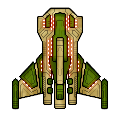
The beautiful spaceship above is your spaceship. In this ZType / Z Type game, you should shoot the approaching enemy spaceships up. The enemy spaceships will approach from the opposite side. But they will not be able to shoot you until they are very close to you. Type the word you see behind your target enemy spaceship before they shoot you.
Very important: Always try to shoot the nearest spaceship first so that no enemy can approach very close to shoot you.
Every time you select a word / enemy, the color of target word will change. Once you successfully finish typing your target word, an explosion will occur and your target enemy will go away.
To select / change difficulty level, please type / press 1, 2, or 3 on your keyboard when you see the game start or game over screen.
You must type fast to win every time in this ZType / Z Type game.
In the easy level, you must score minimum 26 words per minute to win. In the medium level, minimum 46 words per minute is required. But in the hard level, you need minimum 81 words per minute to win.
Virtual Gold Medals: If you score more than 80 words per minute, you will get three virtual gold medals which is the highest rank in this game. If you are winning three virtual gold medals every time, you surely have professional typing skill which is a desired skill for many people. But you get two virtual gold medals if score between 61 and 80. Finally, you get only one gold medal for scoring between 46 and 60.
The spaceships in this ZType / Z Type game are designed by MillionthVector. Thanks to them.
1. Typing Practice » Beginner Level » Home Row (1 - 17)
Practice Lesson 1: Index fingers: J and F
Practice Lesson 2: Middle fingers: K and D
Practice Lesson 3: Review: JFKD
Practice Lesson 4: Ring fingers: S and L
Practice Lesson 5: Pinkie fingers: A and ;
Practice Lesson 6: Index fingers: G and H
Practice Lesson 7: Back and forth
Practice Lesson 8: Left hand keys 1
Practice Lesson 9: Left hand keys 2
Practice Lesson 10: Right hand keys 1
Practice Lesson 11: Right hand keys 2
2. Typing Practice » Beginner Level » Top Row (18 - 32)
Practice Lesson 18: Index fingers: R and U
Practice Lesson 19: Middle fingers: E and I
Practice Lesson 20: Ring fingers: W and O
Practice Lesson 21: Pinkie fingers: Q and P
Practice Lesson 22: Index fingers: T and Y
Practice Lesson 23: Back and forth
Practice Lesson 24: All left hand 1
Practice Lesson 25: All left hand 2
Practice Lesson 26: All right hand 1
Practice Lesson 27: All right hand 2
3. Typing Practice » Beginner Level » Bottom Row (33 - 46)
Practice Lesson 33: Index fingers: V and M
Practice Lesson 34: Middle fingers: C and ,
Practice Lesson 35: Ring fingers: X and .
Practice Lesson 36: Pinkie fingers: Z and /
Practice Lesson 37: Index fingers: B and N
Practice Lesson 38: Back and forth
Practice Lesson 39: All left hand 1
Practice Lesson 40: All left hand 2
Practice Lesson 41: All right hand 1
Practice Lesson 42: All right hand 2
4. Typing Practice » Beginner Level » Miscellaneous (47 - 68)
Practice Lesson 47: Review 1: Left hand words
Practice Lesson 48: Review 2: Right hand words
Practice Lesson 49: Review 3: Alternating hand words
Practice Lesson 50: Capitals 1
Practice Lesson 51: Capitals 2
Practice Lesson 52: Capitals 3
Practice Lesson 53: Capitals 4
Practice Lesson 62: Numeric Keypad 1
Practice Lesson 63: Numeric Keypad 2
Practice Lesson 64: Numeric Keypad 3
Practice Lesson 65: Numeric Keypad 4
Practice Lesson 66: Easy Words
Practice Lesson 67: Easy Words
Practice Lesson 68: Easy Words
5. Typing Practice » Intermediate Level (69 - 110)
Practice Lesson 69: Common Letter Combinations - CK
Practice Lesson 70: Common Letter Combinations - CH
Practice Lesson 71: Common Letter Combinations - PH
Practice Lesson 72: Common Letter Combinations - GH
Practice Lesson 73: Common Letter Combinations - TH
Practice Lesson 74: Common Letter Combinations - DG
Practice Lesson 75: Common Letter Combinations - ION
Practice Lesson 76: Common Letter Combinations - OUS
Practice Lesson 77: Common Letter Combinations - ATE
Practice Lesson 78: Common Letter Combinations - QU
Practice Lesson 79: Common Letter Combinations - IAL
Practice Lesson 80: Common Letter Combinations - ENT
Practice Lesson 81: Common Letter Combinations - ER
Practice Lesson 82: Common Letter Combinations - GRA
Practice Lesson 83: Common Letter Combinations - OR
Practice Lesson 84: Common Letter Combinations - ABLE
Practice Lesson 85: Common Letter Combinations - IC
Practice Lesson 86: Common Letter Combinations - EI
Practice Lesson 87: Common Letter Combinations - ACY
Practice Lesson 88: Common Letter Combinations - EX
Practice Lesson 89: Common Letter Combinations - ON
Practice Lesson 90: Common Letter Combinations - IN
Practice Lesson 91: Common Letter Combinations - ING
Practice Lesson 92: Common Letter Combinations - ARY
Practice Lesson 93: Common Letter Combinations - LY
Practice Lesson 94: Common Letter Combinations - GY
Practice Lesson 95: Common Letter Combinations - ED
Practice Lesson 96: Common Letter Combinations - AL
Practice Lesson 97: Common Letter Combinations - TRAN
Practice Lesson 98: Common phrase practice 1
Practice Lesson 99: Common phrase practice 2
Practice Lesson 100: Common phrase practice 3
Practice Lesson 101: Common phrase practice 4
Practice Lesson 102: Common phrase practice 5
Practice Lesson 103: Common phrase practice 6
Practice Lesson 104: Common phrase practice 7
Practice Lesson 105: Common phrase practice 8
Practice Lesson 106: Common phrase practice 9
Practice Lesson 107: Common phrase practice 10
Practice Lesson 108: Common phrase practice 11
Practice Lesson 109: Common phrase practice 12
Practice Lesson 110: Common phrase practice 13
6. Typing Practice » Advanced Level (111 - 144)
Practice Lesson 111: Using Right Hand SHIFT Key
Practice Lesson 112: Using Left Hand SHIFT key
Practice Lesson 113: Using Each SHIFT Key
Practice Lesson 114: Left hand only - short words
Practice Lesson 115: Left hand only - longer words
Practice Lesson 116: Right hand only - easy words
Practice Lesson 117: Right hand only - harder words
Practice Lesson 118: Words with alternate hands letters
Practice Lesson 119: Numbers and Special Characters - Left hand
Practice Lesson 120: Numbers and Special Characters - Right hand
Practice Lesson 121: Numbers and Special Characters - Left hand - More difficult
Practice Lesson 122: Numbers and Special Characters - Right hand - More difficult
Practice Lesson 123: Tongue twisters 1
Practice Lesson 124: Tongue twisters 2
Practice Lesson 125: Tongue twisters 3
Practice Lesson 126: Tongue twisters 4
Practice Lesson 127: Tongue twisters 5
Practice Lesson 128: Tongue twisters 6
Practice Lesson 129: Tongue twisters 7
Practice Lesson 130: Tongue twisters 8
Practice Lesson 131: Tongue twisters 9
Practice Lesson 132: Tongue twisters 10
Practice Lesson 133: Tongue twisters 11
Practice Lesson 134: Tongue twisters 12
Practice Lesson 135: Tongue twisters 13
Practice Lesson 136: Tongue twisters 14
Practice Lesson 137: Tongue twisters 15
Practice Lesson 138: Tongue twisters 16
Practice Lesson 139: Tongue twisters 17
Practice Lesson 140: Tongue twisters 18
Practice Lesson 141: Tongue twisters 19
Practice Lesson 142: Tongue twisters 20
Practice Lesson 143: The hardest words to type 1
Practice Lesson 144: The hardest words to type 2
7. Typing Practice » Miscellaneous (145 - 166)
Practice Lesson 145: Alphanumeric Typing Test: 1
Practice Lesson 146: Alphanumeric Typing Test: 2
Practice Lesson 147: Alphanumeric Typing Test: 3
Practice Lesson 148: Alphanumeric Typing Test: 4
Practice Lesson 149: Alphanumeric Typing Test: 5
Practice Lesson 150: Alphanumeric Typing Test: 6
Practice Lesson 151: Alphanumeric Typing Test: 7
Practice Lesson 152: Alphanumeric Typing Test: 8
Practice Lesson 153: Alphanumeric Typing Test: 9
Practice Lesson 154: Alphanumeric Typing Test: 10
Practice Lesson 155: English Alphabet Typing Test
Practice Lesson 156: ASDF JKL; - Home-Row Practice
Practice Lesson 157: QWERT YUIOP - Top-Row Practice
Practice Lesson 158: ZXCVB NM,./ - Bottom-Row Practice
Practice Lesson 159: Left Hand Typing Practice
Practice Lesson 160: Right Hand Typing Practice
Practice Lesson 161: Symbols & Special Character
Practice Lesson 162: Numbers & symbols
Practice Lesson 163: Random Word Typing
Practice Lesson 164: Common Word Typing
Practice Lesson 165: Legal Typing Test
Practice Lesson 166: Medical Typing Practice
Practice Lesson 167: Home-Row Typing Practice Words
Practice Lesson 168: Home-Row and Upper Row Typing Practice Words
Online Typing Test in English
1 Minute Typing Test
2 Minute Typing Test
3 Minute Typing Test
5 Minute Typing Test
10 Minute Typing Test
10 Typing Games / Typewriting Games










Bookmark This Page (Ctrl + D)


Typing Test — Top 10 (ten) World Ranking
Get an online typing test certificate now
Please note: We may delete certificates older than 6 (six) months.
Best Score | World Ranking | Countrywise Ranking
Get a Certificate | Register | Log In
WPM = Words per minute
| Sl. | Name | Level | Net WPM | Accuracy | Country |
|---|---|---|---|---|---|
| 1. | Broderick Bagert | Professional | 111 | 99.10% | United States |
| 2. | Farhan | Professional | 93 | 93.96% | Indonesia |
| 3. | Teoh You Le | Professional | 83 | 95.41% | Malaysia |
| 4. | Fluffy Toucan | Fast | 73 | 88.01% | Albania |
| 5. | Fluffy Toucan | Fast | 71 | 92.25% | Albania |
| 6. | Laura Elizabeth Ewing | Fast | 67 | 94.38% | United States |
| 7. | Laura Elizabeth Ewing | Fluent | 60 | 93.79% | United States |
| 8. | abdullah mashia | Fluent | 59 | 98.34% | Puerto Rico |
| 9. | Laura Elizabeth Ewing | Fluent | 59 | 90.77% | United States |
| 10. | Damyan Todorov | Fluent | 57 | 93.49% | Bulgaria |
How we grade your typing speed:
| Level | Net WPM |
|---|---|
| Slow | 0 - 25 |
| Average | 26 - 45 |
| Fluent | 46 - 60 |
| Fast | 61 - 80 |
| Professional | 80+ |
Performance Graph — Based on top 10 (ten) world ranking
Typing Test — Last 25 Practice Results
Get an online typing test certificate now
Please note: We may delete certificates older than 6 (six) months.
Best Score | World Ranking | Countrywise Ranking
Get a Certificate | Register | Log In
The following list shows how some users of this website have performed within last 24 hours.
WPM = Words per minute
How we grade your typing speed:
| Level | Net WPM |
|---|---|
| Slow | 0 - 25 |
| Average | 26 - 45 |
| Fluent | 46 - 60 |
| Fast | 61 - 80 |
| Professional | 80+ |
Performance Graph — Based on last 25 results
Master Your Speed with Ztype typing com
The sound of keys clicking. The thrill of moving your fingers faster than ever before. The little rush of excitement when you beat your previous typing speed. Have you ever wished typing could feel less like a chore and more like a game? Something fun? Something exciting? Something that actually makes you want to practice? If you have, then this is where ztype typing com enters the picture. But here is the real mystery. How does something so simple help so many people type faster than they ever thought they could? And why do people keep coming back to ztype typing com even when they already know how to type decently? Keep reading, because the answer to that question might be exactly what you have been looking for.
A Story to Start the Journey
Imagine a student sitting in front of a computer. Let’s call him Sam. Sam is not great at typing. He pokes the keyboard with two or three fingers. It is slow. It is frustrating. Every time he tries to write something on his computer, it feels like his fingers cannot keep up with his mind. Then his teacher shows him a typing game on ztype typing com. It looks like space ships floating across the screen. Words appear as enemies. To destroy the enemies, Sam has to type the word correctly. The faster he types, the faster he wins.
Suddenly, typing is not boring anymore. It is a game. It is a challenge. It is exciting. Day by day, Sam begins typing faster without even noticing. And one day, Sam types without looking at his keyboard. This is the magic of ztype typing com. It turns learning into something enjoyable. It changes your mindset. And when your mindset changes, your skill grows naturally.
The Problem Most Beginners Face
Typing feels hard for beginners because our fingers are not used to moving quickly across a keyboard. We were not born knowing how to type. It is a skill we must learn. The problem is, most of us learn typing through boring drills and repeated lessons. Without motivation, most people quit after a few days. You may have tried typing training apps before and lost interest quickly. You are not alone. Almost everyone starts typing practice with excitement but then gets bored. The question is, how do we stay consistent?
This is where ztype typing com becomes important. Because ztype typing com gives us what we have been missing. It turns typing into a game we want to come back to. When practice becomes something we enjoy, our fingers learn faster. Our brain learns faster. And we stick with it long enough to see real progress.
What Makes ztype Typing com Special
ztype typing com is an online typing game based on space shooting action. Words fly down on the screen like enemy ships. To destroy them, you must type the word correctly. If you type slowly, the enemies get closer. If you type quickly and accurately, the enemies explode before reaching you. It trains both speed and accuracy at the same time.
Unlike traditional lessons, ztype typing com does not force you to think about every key. Instead, it encourages your fingers to react instinctively. This is important because fast typing comes from muscle memory, not from thinking about each letter. Muscle memory is the key to typing faster without stress.
How ztype Typing com Improves Your Typing Speed
Typing fast requires two things. Accuracy and flow. If you type quickly but make too many mistakes, your speed drops. If you type accurately but too slowly, you cannot write your ideas fast enough. ztype typing com trains the balance between both. Here is how:
First, it challenges your reflexes. Your fingers learn how to move fast and hit the correct keys without hesitation.
Second, it pushes your brain to stay focused. Because the words appear in real time, you stay in the moment. You cannot drift away mentally.
Third, it keeps practice enjoyable. You feel like you are playing, not studying. And when learning feels fun, you do it more. And when you do it more, your progress becomes automatic.
Step-by-Step Guide to Start with ztype Typing com
Step 1: Go to the game. Open your browser and visit ztype typing com. There is no sign-up required. It loads instantly.
Step 2: Start the first level. The game begins as soon as you press any key. You will see words fall from the top of the screen.
Step 3: Type the words. Type the letters of each word exactly as shown. Every correct letter shoots lasers from your ship.
Step 4: Stay calm. Do not rush. Accuracy is more important at the beginning than speed. Your speed will grow naturally.
Step 5: Play a little every day. Even ten minutes daily can create real progress. It is better to practice a little every day than practice a lot once in a while.
The Learning Curve: What to Expect Over Time
During your first few days, you may feel slow. You might make mistakes. This is completely normal. With ztype typing com, you start building muscle memory one keystroke at a time. Your fingers get familiar with where each key is. Your brain begins to trust your hands. And then something changes. You stop looking at the keyboard. Your fingers move faster without effort. This moment feels amazing.
Example of Real Progress
Let’s say you start typing today at 20 words per minute. After one week of playing ztype typing com for ten minutes daily, you might reach 30 words per minute. After a month, you might reach 45 words per minute. Some people even reach 70 or 80 words per minute with enough practice. It is not about being naturally talented. It is about being consistent.
Why Fun Learning Works Better Than Forced Learning
Our brain loves rewards. When we play a fun game like ztype typing com, our brain releases dopamine, the chemical that makes us feel happy. This dopamine encourages us to keep going. In other words, fun learning tricks our brain into practicing more. When something feels like a chore, we quit. But when something feels like play, we continue. That is why typing practice through ztype typing com works so well for beginners, students, professionals, and even kids.
How to Stay Motivated
Make it a daily routine. Just five to ten minutes can make a difference. Keep track of your progress. When you see improvement, even a small one, you feel proud. Reward yourself. If you complete seven days of practice, treat yourself to something enjoyable. Motivation grows from small wins.
Adding Variety to Your Practice
You can use ztype typing com along with other tools. For example, you can try a typing speed test once a week to measure progress. You can also try typing practice paragraphs to improve flow and sentence structure. But ztype typing com can remain your core training tool because it keeps you engaged.
Using Proper Hand Position
Place your fingers on the home row keys. This means:
Left hand: A, S, D, F
Right hand: J, K, L, ;
Your thumbs should rest on the spacebar. By using this position, your fingers reach all other keys easily. ztype typing com helps reinforce this position naturally through repeated play.
Common Mistakes Beginners Make
One common mistake is typing while looking at the keyboard. This slows down learning. Try to look at the screen as much as possible. Another common mistake is pressing keys too forcefully. Gentle touches allow faster movement. Also, do not panic when you make mistakes. Everyone makes mistakes during practice. The goal is consistency, not perfection.
Who Should Use ztype Typing com?
Students learning to type for school assignments.
Adults who work with computers every day.
Gamers who want faster keyboard reflexes.
Anyone taking typing speed tests.
People preparing for data entry or office jobs.
Kids who want to learn typing while having fun.
If you want faster typing and better accuracy, ztype typing com is a perfect fit.
Why You Should Start Today
Typing is a life skill. It saves time. It improves productivity. It helps you write your thoughts more clearly. Every minute you spend practicing typing is an investment in your future. ztype typing com makes that investment enjoyable.
The Curiosity Loop We Opened Earlier
Remember the mystery at the beginning? Why do people keep coming back to ztype typing com even when they already type well? The answer is simple. The game is not just about typing. It is about challenge and self-improvement. It gives you a reason to push your limits. It rewards you every time you do better than before. It turns you into someone who strives to improve a little every day. And those daily improvements are what lead to real mastery.
Building Confidence Through Repetition
Confidence in typing does not come from thinking about every key. It comes from doing it again and again until it feels effortless. When using ztype typing com, your fingers naturally learn to move faster through repetition. You are not forcing yourself to memorize the keyboard. You are allowing your brain and hands to get familiar with it through continuous play. Over time, repetition turns into comfort, and comfort turns into confidence.
Understanding Word Recognition Speed
Typing quickly is not only about how fast your fingers move. It also depends on how fast your brain recognizes words. When you play ztype typing com, your brain practices identifying words quickly under a fun kind of pressure. This increases what is known as visual recognition speed. The more you see words, the faster you recognize them. The faster you recognize them, the faster your fingers react. This is the hidden advantage of ztype typing com that many people do not realize at first.
How Ztype Helps You Train Under Pressure
When the words on the screen move closer, your mind feels a small sense of urgency. This is not stressful pressure. It is playful pressure. It keeps your mind engaged. You stay alert and focused. Learning to type under this small amount of pressure prepares you for real-world typing situations. For example, typing in class before time runs out, typing during a meeting, or typing quickly when chatting. ztype typing com trains your brain to stay calm and accurate even when typing fast.
Creating a Practice Schedule That Works
To see real results, it helps to have a simple practice routine. You do not need hours of practice. Here is one example:
Play ztype typing com for five minutes in the morning.
Play again for five minutes in the evening.
Once a week, take a typing test to measure progress.
This routine only takes ten minutes a day. Yet, it is enough to create visible improvement. Consistency will always matter more than the amount of time spent in one session.
Avoiding the Trap of Overthinking
Many people try to type by thinking about every single letter. This slows everything down. The goal is to trust your hands. ztype typing com helps remove overthinking. As you play, your hands learn where keys are without needing your brain to micromanage every movement. Little by little, your hands begin to glide across the keyboard. This is the natural flow you want to achieve.
Turning Mistakes Into Lessons
Mistakes are not failures. They are information. When you miss a key or mistype a word in ztype typing com, your brain notices it and corrects it next time. You do not have to stop, rewind, or get frustrated. The learning happens automatically. One of the reasons this game works so well is that mistakes are a part of the process. They do not interrupt the experience. Instead, they guide improvement.
Improving Finger Coordination
Typing requires each finger to move independently and quickly. At first, this feels unnatural. But with repeated play, each finger begins to take responsibility for certain keys. This is finger coordination. ztype typing com encourages this because every word appears unpredictably. Your fingers learn to move where they need to go without hesitation. This builds smoothness and rhythm in typing.
Keeping Practice Fun for Kids
Kids learn fastest when the activity is playful. If children are asked to sit and do typing drills, they often lose interest quickly. But when they play ztype typing com, they feel excitement and achievement. They want to try again and again because it feels like a game, not homework. This makes it a great choice for students learning keyboarding skills.
Tracking Your Visible Progress
Progress does not always show immediately. But after several days of consistent play, you start to notice little changes. Your fingers move more freely. Your typing feels lighter. You look at the keyboard less often. These small wins add up. Over weeks, your typing speed may increase significantly. Seeing progress is one of the most powerful motivators to keep going.
Why Speed Matters in the Real World
Typing faster does more than help you complete computer tasks. It allows your ideas to flow from your mind to the screen without interruption. If your fingers can keep up with your thoughts, your writing becomes more natural and expressive. ztype typing com can help bridge this gap between thought and action. When typing becomes effortless, your mind stays focused on the message instead of the mechanics.
Encouraging Healthy Practice Habits
Breaks are important. If your hands feel tense, relax for a minute. Stretch your fingers, roll your wrists gently, and then continue. Typing should feel comfortable, not painful. ztype typing com encourages short sessions, which naturally prevent overuse. This balance helps maintain long-term habit-building without burnout.
The Long-Term Advantage of Mastering Typing
Typing is a skill that will benefit you for your entire life. Whether writing emails, homework, essays, messages, or job applications, typing efficiently saves time and reduces stress. With ztype typing com, you can build this lifelong skill in a fun and enjoyable way. Once you become comfortable with fast typing, it feels like a superpower. You can communicate faster, work faster, and think more clearly.
How to Challenge Yourself Over Time
Once you feel comfortable with the basic levels, try increasing your personal goals. For example, challenge yourself to beat your previous score every few days. You can also try purposely focusing on accuracy for one session, then speed in another. ztype typing com makes it easy to adjust your style depending on what you want to improve.
Celebrating Your Progress as You Improve
Every improvement, no matter how small, is a win worth celebrating. Whether you typed your first paragraph without looking down or added five more words per minute to your speed, these achievements show growth. The more you acknowledge your progress, the more motivated you will become to continue practicing.
Preparing for Typing Tests and Exams
If you are preparing for school typing tests or job-related typing exams, ztype typing com is a helpful training tool. It sharpens your reflexes, accuracy, and speed in a dynamic environment. Practicing daily can make real typing tests feel easier because you have already trained under playful pressure.
Maintaining Momentum Over Months
The key to mastery is not speed alone. It is consistency. Even when you feel you have reached a good level, practicing occasionally on ztype typing com helps maintain your typing speed. Just like staying in shape requires regular exercise, keeping typing skills sharp benefits from small but frequent practice sessions.
Continuing the Journey
Typing skill is something you can always improve. Whether you want to type faster, more accurately, or more comfortably, there is always room to grow. ztype typing com offers a fun and enjoyable way to keep improving. With regular practice, patience, and curiosity, you can continue moving forward and making progress every day.
Final Thoughts
Typing faster can change your life. It can help you work smarter, finish tasks faster, and express your ideas without interruption. And the best part is, you do not need expensive software or complicated lessons. You just need a keyboard, a few minutes a day, and a fun game like ztype typing com to guide your fingers.
Start today. Practice daily. And watch your typing speed rise faster than you ever expected.
More Resources
- Best Learn to Type Software for Beginners
- BBC Dance Mat Typing: Learn to Type the Fun Way
- Improve English Test Typing Speed for Beginners
- Best Typing Study Techniques for Faster Results
- Best Free Time Typing Test Online for Beginners
- Paragraph Typing Speed Test for Beginners Online
- Typing Training Com Lessons for Beginners
- Improving My Typing Speed for Beginners
- Practice Online Typing and Improve Accuracy Quickly
- Typing Master Typing Test for Speed and Accuracy